How to block a customer from ordering in Shopify
Shopify has no built-in setting that blocks a named customer before an order exists. Flow rules run after the order is created, theme code only affects signed-in customers, and Fraud Control's checkout rules are available only to stores on Shopify Payments. The only mechanism that runs inside checkout itself is a checkout validation function, which is what blocking apps use.
Why this question keeps coming up
A merchant usually arrives here after the same person has cost them money more than once: serial returns, chargebacks, a card being tested, or an address they no longer ship to. The obvious expectation is a setting somewhere that says "do not let this person order again". There is no such setting.
What exists instead is a set of tools that each solve a nearby problem, and the difference between them is timing: whether they act before the order exists, or after. That distinction decides whether you pay a transaction fee, restock inventory, and risk a chargeback.
Shopify Flow: runs after the order exists
Flow is the automation most often suggested, and it can cancel or tag an order from a customer you do not want. But it is triggered by an order that has already been created, which means the payment was already taken and the fee already charged.
This is not a configuration mistake. Asked directly whether Flow could stop an order from being placed, a Shopify staff member answered that Flow does not run in checkout, and that apps using Functions would be required to do that instead.
Fraud Control: requires Shopify Payments
Fraud Control is Shopify's own free app, and its checkout rules do block a checkout before it becomes an order — which is the right timing. Its documented limit is who can use it: the Help Center states that Fraud Control checkout rules are only available for merchants using Shopify Payments.
If your store takes payment through another provider, this option is closed to you regardless of how your rules are written.
Merchant reviews also report that its email filters work on individual addresses rather than whole domains, so a sender rotating through addresses at the same domain needs a new rule each time. Shopify's documentation does not state the matching behaviour either way, so treat that as reported rather than documented.
Fraud Filter: retired
Older answers still recommend the Fraud Filter app. It was retired at the start of 2025, and advice that assumes it is still available should be discounted.
Theme code and customer tags: partial at best
Blocking in the theme — hiding the checkout button for a tagged customer — only works when the buyer is signed in to a customer account. A guest checkout never reads the tag, and anyone can open the store in a private window.
Customer tags themselves are useful, but a tag alone enforces nothing at checkout. Something has to read the tag at the moment of checkout and act on it.
What actually runs during checkout
Shopify's checkout validation functions are the mechanism that runs inside checkout and can reject it. A store can have up to 25 of them active, and they apply to accelerated wallets such as Shop Pay, PayPal, Apple Pay and Google Pay as well as the standard flow.
They see the cart: the buyer's email, the delivery address, and whether a signed-in customer carries a given tag. Three things are worth knowing before you rely on them:
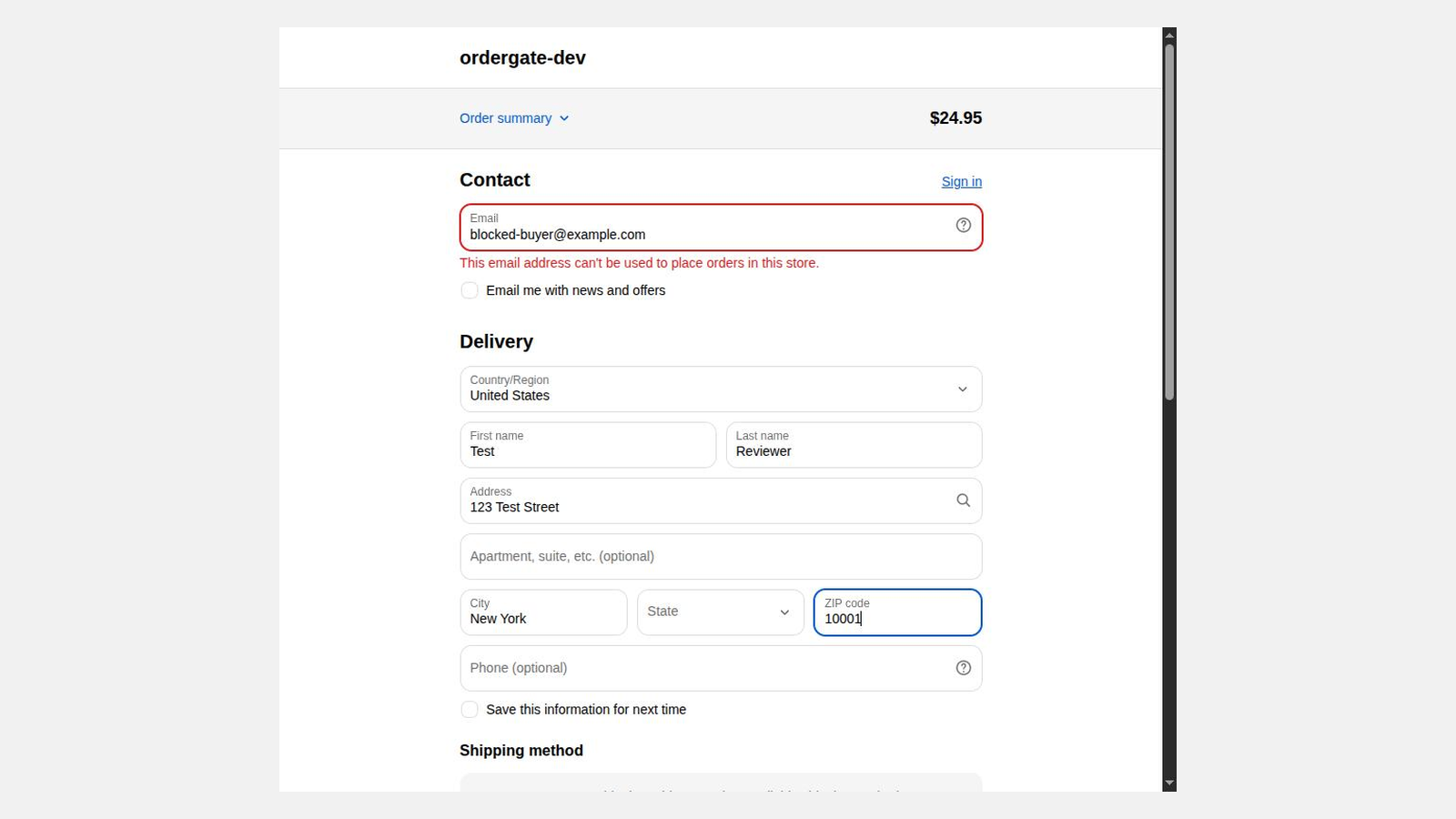
- There is no IP address in the input and functions have no network access, so nothing evaluated at checkout can block by IP. An app advertising IP blocking is doing it in the storefront layer, which a determined buyer can bypass.
- In accelerated wallet sheets, the rejection message is not displayed. The buyer is returned to checkout without an explanation. Blocking still works; the explanation does not reach them.
- Validation does not apply to orders created through the Create Order API, order editing, Shopify POS, pre-orders and Try Before You Buy, or subscription orders.
So what should you actually do
If you are on Shopify Payments and only need to stop a handful of named addresses, Fraud Control is free and enough — start there.
If you are not on Shopify Payments, or you need to block a whole email domain, a country, a city, a postal-code prefix, or a customer tag, you need a checkout validation app. That is the category OrderGate is in: rules are evaluated inside checkout validation, so a blocked buyer never becomes an order, and it works whether or not the store uses Shopify Payments.
Whatever you choose, prefer a tool that lets you watch before it enforces. Over-blocking real customers is the failure mode of this whole category, and a rule that looks obvious can match more than you expect.